
Reminders can also be added from the application. To add reminders, consider the following steps.
To Get Started
- Login to the Mobile application using your credentials.
- Go to the Settings
 screen.
 - Click on Reminder Rule.
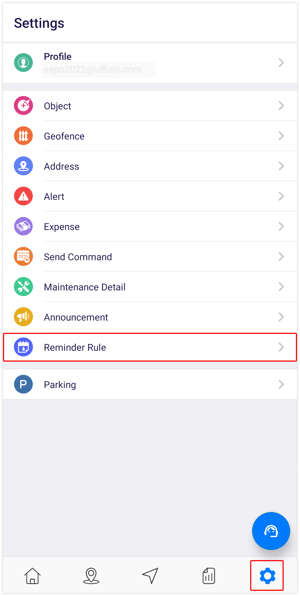
After selecting the Reminder Rule, you will be directed to the reminders overview screen, where you can manage all existing reminders.
To Add Reminder Rule
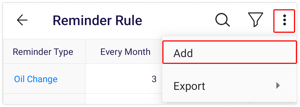
- Click on the
 icon on the top right corner of the screen.
 - Click on Add.
- Choose the Reseller and Company from the provided list for which you wish to configure the reminder rule.
- Choose the appropriate Reminder Type from the available options in the list.
.png?width=364&height=669&name=Frame%20659%20(3).png)
-
- Select the Schedule type for the reminder: Recurring or One Time.
- Based On: Select the criteria that will define your reminder rule, choosing from options such as Month, Distance, or Engine Hour, and enter the required details accordingly.
- Choose the Object from the list that you would like to set the reminder for.
- Choose an Action from the available options, such as SMS, Email, or Notification, to specify your preferred method of delivering the reminder.
- Click on the Save 💾 icon.