
The command details sent to the devices can be downloaded in XLS or PDF format from the application. To download the command details, consider the following steps:
To Get Started
- Login to the mobile application using your credentials.
- Go to the Settings
 screen.
 - Click on Send Command.
.png?width=300&height=597&name=Frame%201144%20(1).png)
Upon clicking on Send Command, you will be directed to the Send Command Overview page, where you can view all previously sent commands.
To Download Records
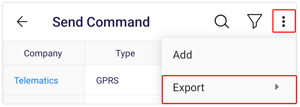
- Click on the
 icon on the top right corner of the screen.
 - Click on Export.
- Here the user selects the format in which the details need to be downloaded:
PDF or XLS.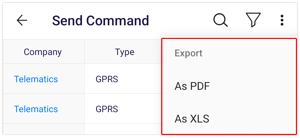
- A file with a PDF or XLS extension gets downloaded.
- Here the user selects the format in which the details need to be downloaded: