
Expense details can be downloaded in XLS or PDF format from the mobile application. To download the expense details, consider the following steps.
To Get Started
- Login to the Mobile application using your login credentials.
- Go to Settings
 screen.
 - Click on Expense.
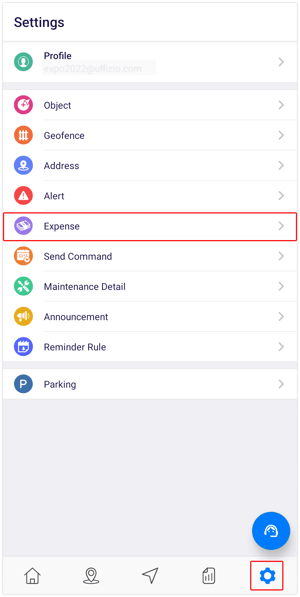
After selecting Expense, you will be directed to the Expense overview screen, where you can view and manage all existing expenses.
To Download Expense Records
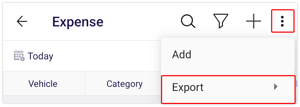
- Click on the
 icon on the top right corner of the screen.
 - Click on Export.
- At this point, you will have the option to choose your preferred format for downloading the details: either PDF or XLS.
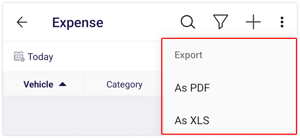
- At this point, you will have the option to choose your preferred format for downloading the details: either PDF or XLS.
-
- A file with a PDF or XLS extension gets downloaded.